How to Index Medium Articles and Substack Newsletters in Under 48 Hours

Publishing a strategic guest post, parasite SEO piece, or long-form thought-leadership essay on high-authority platforms like Medium or Substack is one of the most effective ways to capture search traffic and pass valuable link equity to your money site. Both domains command immense domain authority, clean technical footprints, and near-instant crawl priority from major search engines.
Yet, many content creators and SEO practitioners face a frustrating hurdle: the content sits unindexed for weeks, or worse, fails to show up in search engine results pages (SERPs) altogether.
When a URL on an authority domain does not index promptly, your publishing momentum stalls, competitive advantage diminishes, and downstream tier-1 link signals remain idle.
This comprehensive guide details the technical bottlenecks responsible for slow indexing on Medium and Substack, and outlines a multi-vector, battle-tested playbook to secure search crawler discovery and verified indexing in under 48 hours.
Why High-Authority Platforms Struggle with Indexing
A common misconception among digital marketers is that publishing on a domain with high PageRank guarantees automatic, rapid indexing. In practice, the mechanics of modern search discovery function differently.
Millions of URLs Compete for Daily Crawl Allocations
Both Medium and Substack host millions of published articles, community comments, tag archives, and author bios. While Googlebot and Bingbot crawl these root domains constantly, their crawl budgets are not infinite. Crawlers cannot inspect every newly published page instantly. Search bots allocate crawl resources based on:
- Internal linking depth (how many clicks away the post is from the root domain).
- Real-time user interaction signals.
- Algorithmic evaluation of immediate value versus duplicate or low-effort content.
The Subdomain and Orphan Page Bottleneck
On Substack, publications typically live on custom subdomains (brand.substack.com) or custom root domains. When you launch a fresh publication, that subdomain possesses zero native backlink authority and no established crawl path. If your post is not linked from high-traffic category feeds, it effectively functions as an orphaned asset. Search bots have no natural reason to discover the URL unless prompted by an external crawl catalyst.
Aggressive Platform Canonicalization and Syndication Rules
Medium allows authors to set cross-domain canonical tags to protect original publishers from duplicate content penalties. If a canonical tag is configured improperly, or if the internal platform algorithms deem the article overly duplicative of an existing web resource, Google will quietly mark the page as “Crawled – currently not indexed” or assign indexing preference to a competing URL.
Platform-Specific Diagnostic Checks Before Publishing
Before forcing search bot attention, ensure the technical baseline of your publication asset is flawless. Sending crawler bots to a page flagged with technical barriers wastes crawl equity and delays indexing.
Medium Pre-Publishing Audit
- Inspect the Canonical Tag: Go to your story settings on Medium (… menu > Story settings > Advanced settings). Verify whether the story is marked as originally published elsewhere. If you want this Medium post to index as the primary asset, ensure the canonical link points directly to the Medium post’s own URL, not an external or outdated source.
- Optimize Tag Selection for Platform Architecture: Medium’s native tag pages (e.g., /tag/technology or /tag/marketing) are heavily crawled indexation paths. Always choose all 5 allowed tags carefully. Pick tags with active reader followings so your post surfaces inside Medium’s public, indexable tag archives immediately upon publishing.
- Slug Cleanliness and Target Keywords: Medium auto-generates URL slugs based on your initial draft title, often appending an arbitrary alphanumeric hash at the end (e.g., title-text-a1b2c3d4e5f6). Keep the front portion of that slug clean, focused on your target keyword, and free of unnecessary filler words.
Substack Pre-Publishing Audit
- Configure Discoverability Settings: Navigate to your Substack Settings > Publication Details. Ensure your publication is public and not shielded behind private subscription walls or email-only delivery modes.
- Section Tagging & Main Navigation: Under your publication layout settings, map your post to a defined “Section” or category that appears in your top navigation menu. Navigation links provide persistent, shallow-depth crawl paths that search crawlers parse during routine publication refreshes.
- SEO Title & Description Overrides: In post draft settings, Substack allows you to customize the public search snippet independently from your email subject line. Craft a distinct, entity-rich SEO title (under 60 characters) and a descriptive meta summary (140–155 characters) to prevent automatic snippet truncation in the SERPs.
The 48-Hour Technical Indexing Framework
Once your post is live and technically sound, execute this sequential 4-step framework to transition your URL from unknown to fully indexed within 48 hours:
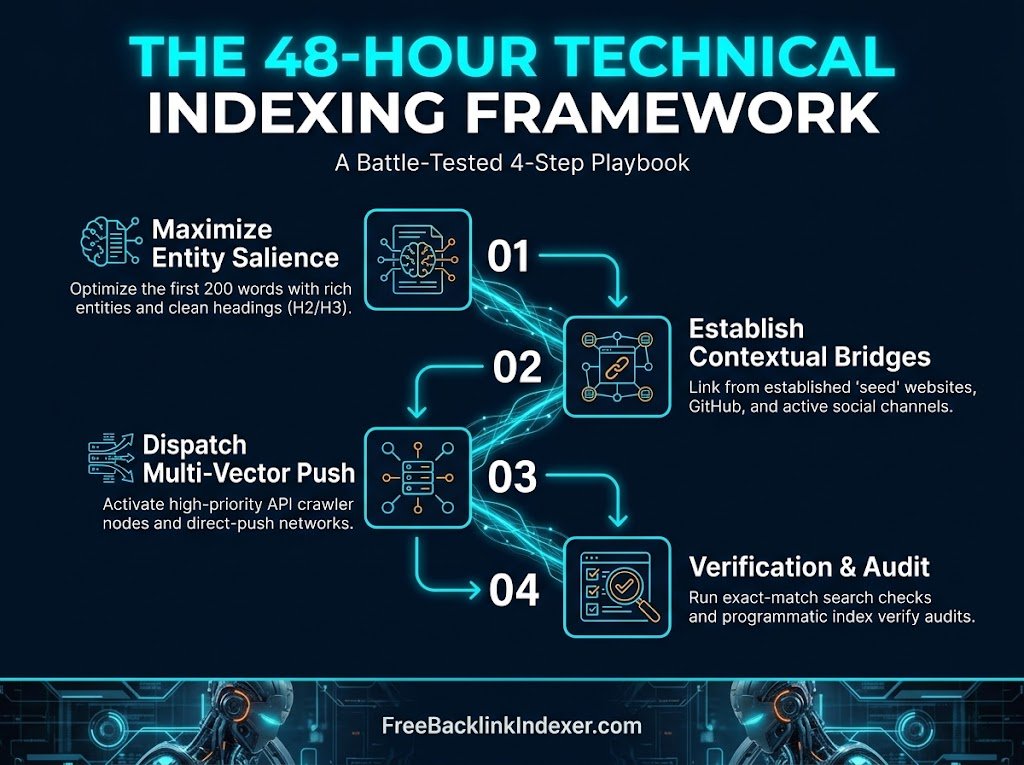
Step 1: Maximize Entity Salience in the First 200 Words
Modern search engines do not rely solely on simple keyword density; they evaluate Natural Language Processing (NLP) entities, topical relationships, and structural clarity.
When Googlebot makes its initial fast-fetch pass, it evaluates the top of the HTML document to determine whether the content provides distinct value or resembles generic spam.
- Front-load primary and secondary entities: In your first two paragraphs, explicitly mention the core topic, related industry standards, recognized organizations, tools, or canonical concepts.
- Use descriptive heading tags (H2/H3): Avoid vague headings like “The Solution” or “Step 1”. Instead, use explicit labels like “Configuring Medium Story Settings for Crawler Discovery”.
- Incorporate structured data elements natively: Use bulleted comparisons, numbered sequential workflows, and technical tables. Even without direct control over the page’s <head> JSON-LD schema, search bots parse clean semantic HTML structures into featured snippets and answer graphs.
Step 2: Establish High-Authority Contextual Bridges
Because you do not own Medium or Substack at the server level, you cannot directly submit these individual third-party URLs to your personal Google Search Console property. You must bridge the gap using external contextual crawl signals.
The Seed Site Siphon
If you own an established website with an active, daily-crawled sitemap:
- Create a short contextual update, resource round-up post, or documentation note on your own site.
- Embed an editorial link pointing directly to your new Medium or Substack URL.
- Submit your own page’s URL to Google Search Console via the URL Inspection Tool (Request Indexing).
- As Googlebot recrawls your validated domain, it discovers the outbound link, treats it as a fresh discovery path, and follows it directly to the target platform.
High-Authority Platform Cross-Pollination
Search crawlers monitor platform ecosystems continuously. Leverage cross-platform links to build immediate discovery avenues:
- GitHub Public Gists & Repositories: GitHub URLs enjoy continuous crawler activity. Create a public documentation markdown file or README file linking directly to your Medium or Substack analysis.
- Reddit & Developer Communities: Post a helpful, non-promotional summary in a relevant subreddit or specialized niche forum, citing your full publication as the reference source. Googlebot prioritizes community-driven discussions for real-time indexing passes.
- X (Twitter) & LinkedIn Post Ingestion: Search engines maintain near-real-time ingestion pipelines for social URLs. Sharing the live post link from an active, verified profile prompts rapid fetch requests from discovery spiders.
Step 3: Dispatch Multi-Vector API Crawl Pushes
Manual social sharing and internal link bridging establish discovery seeds, but high-volume indexing requires direct crawler triggers. This is where dedicated indexing workflows become critical.
When handling third-party URLs:
- Pre-Audit the Live Response: Verify that the page returns an unambiguous 200 OK HTTP status code and is not returning transient rate-limiting blocks (429 Too Many Requests) or edge caching failures.
- Trigger Multi-Node Discovery Broadcasts: Utilize dedicated indexing suites (such as FreeBacklinkIndexer) that dispatch discovery signals across distributed gateway nodes. These systems alert search engine crawlers simultaneously across diverse network vectors, placing the URL into high-priority processing pipelines rather than waiting for passive discovery.
- Continuous Crawl Cycle Monitoring: Real-time crawler engagement typically occurs within 15 to 30 minutes of API submission, while final database propagation across regional data centers unfolds over a 24- to 48-hour cycle.
Step 4: Verification and Diagnostic Auditing
Never rely on platform view counts or assumptions to confirm indexation. Conduct a rigorous, multi-step verification pass once 24 to 48 hours have elapsed.
| Verification Method | Query Syntax / Procedure | Expected Result | Action if Missing |
| Exact URL Search | site:[your-publication-url.com/post-slug](https://your-publication-url.com/post-slug) | Exact URL displayed in search results | Move to Title String search |
| Verbatim Title Search | “Exact Unique Headline of Your Article” | Snippet appears in top 3 organic results | URL is crawled but filtered; enhance external links |
| Unique Text Fingerprint | “Specific 10-word sentence from middle of body” | Shows whether body text was fully rendered | Indicates partial rendering issues or thin content filter |
| Automated Index Checker | Live programmatic HTTP/SERP audit tool | Confirms cache presence across worldwide edge datacenters | Queue for second-pass priority crawl dispatch |
Key Factors: Medium vs. Substack Indexing Dynamics
1. Document Object Model (DOM) and JavaScript Hydration
- Medium: Runs a dynamic, client-side React rendering framework. While Googlebot executes JavaScript reliably, dynamic page hydration can occasionally cause discrepancies between initial source-code retrieval and final rendering, especially regarding internal links and inline citations.
- Substack: Operates a cleaner, highly optimized server-rendered HTML delivery structure. Text, headings, and standard markdown elements are immediately visible in the raw source response, making it easier for low-resource crawler spiders to parse content without heavy client-side execution delays.
2. Paywalls and Member Access Gates
- Medium: If you place an article behind the “Medium Partner Program” meter, Googlebot is generally granted access via first-click-free or verified user-agent policies. However, aggressive pop-up overlays, registration gates, or poorly managed subscriber prompts can sometimes cause secondary crawlers (like Bingbot or regional engines) to classify the page as a login gateway rather than a substantive content resource.
- Substack: Always ensure the post is marked as “Everyone” in visibility settings. If an article is configured for “Paid Subscribers Only”, Substack deliberately serves a truncated preview followed by a paywall lock. Search engines will index only the brief preview, drastically reducing topical authority and keyword breadth.
3. RSS Feed Utilization
- Substack automatically maintains a clean, standards-compliant RSS feed at [yourname.substack.com/feed](https://yourname.substack.com/feed). Search engine crawlers and feed aggregators check these feeds frequently. Ensuring your Substack publication has a functioning, valid RSS output is one of the fastest automated methods to ensure bots recognize fresh posts within hours of publication.
Troubleshooting: What to Do If Your Post Still Won’t Index
Issue A: “Crawled – Currently Not Indexed”
- The Root Cause: The article lacks structural differentiation. If the content reads like a basic rewrite of existing top-ranking articles, or relies heavily on unedited AI output without proprietary data or unique commentary, it may be filtered out.
- The Solution: Update the live post. Add original data, custom diagrams, step-by-step checklists, or expert analysis. Once updated, drive fresh traffic and dispatch a new crawl signal to force an index re-evaluation.
Issue B: The Duplicate Content / Canonical Conflict
- The Root Cause: If you syndicated an existing article from your primary blog onto Medium without editing it, search engines will identify the matching text and index only the original source, intentionally hiding the secondary publication.
- The Solution: If your goal is for the Medium or Substack piece to rank independently, adjust the narrative angle. Rewrite the opening sections, provide platform-exclusive takeaways, and confirm that the canonical settings match your target ranking strategy.
Issue C: Subdomain Stagnation (New Substack Publications)
- The Root Cause: A brand-new Substack publication on a raw subdomain lacks historical trust. Search bots may visit the root page once and ignore subsequent posts for days.
- The Solution: Build 3 to 5 high-authority tier-2 contextual backlinks directly to your publication’s homepage and its primary category section. Once the root publication gains foundational crawl equity, all child posts published thereafter will index substantially faster.
The 48-Hour Indexing Checklist
- [ ] Canonical URL verified in story settings (points to intended target)
- [ ] SEO title tag customized (under 60 characters, keyword front-loaded)
- [ ] Meta description specified (140-155 characters with clear action intent)
- [ ] Semantic heading hierarchy validated (clean H2 and H3 progression)
- [ ] Core entities and terminology introduced within the first 200 words
- [ ] Post assigned to active, high-traffic platform categories or tags
- [ ] Paywall restrictions disabled or verified friendly to search crawlers
- [ ] Link placed on an authoritative, frequently-crawled tier-1 asset
- [ ] Public social signal shared via active developer, community, or business accounts
- [ ] URL submitted to an automated multi-vector indexing engine
- [ ] Verification audit performed at 24 and 48 hours via exact-match string search
Speed Up Your Backlink Indexing Today
Submit up to 50 links per day completely free on FreeBacklinkIndexer.com with zero credits required.
Launch Free Console